Integrating a third-party application
Any application that speaks OAuth 2.1 / OpenID Connect can use auth-service as its identity provider. This guide walks through the whole path: register the application, sign users in, verify the tokens in your backend, and use the claims for authorization.
Browser / app ──(1) authorization code + PKCE──▶ auth-service
      ▲                                              │
      │                (2) JWT access token (EdDSA)  │
      │                                              ▼
      └──(3) Authorization: Bearer ──▶ your API ──(4) verify with the JWKS, read roles / plan / org_id
Choose a client type
| Your application | Client type | Token endpoint authentication |
|---|---|---|
| Single-page or native app, no backend of its own | Public (isPublic: true) | None. PKCE is mandatory |
| Web application with a server side (recommended for anything that can hold a secret) | Confidential (default) | HTTP Basic (client_secret_basic), plus PKCE |
| A service calling another service, no user | Confidential, client_credentials grant | HTTP Basic |
| An API that only receives bearer tokens | No client needed: it only verifies tokens | — |
1. Register the application
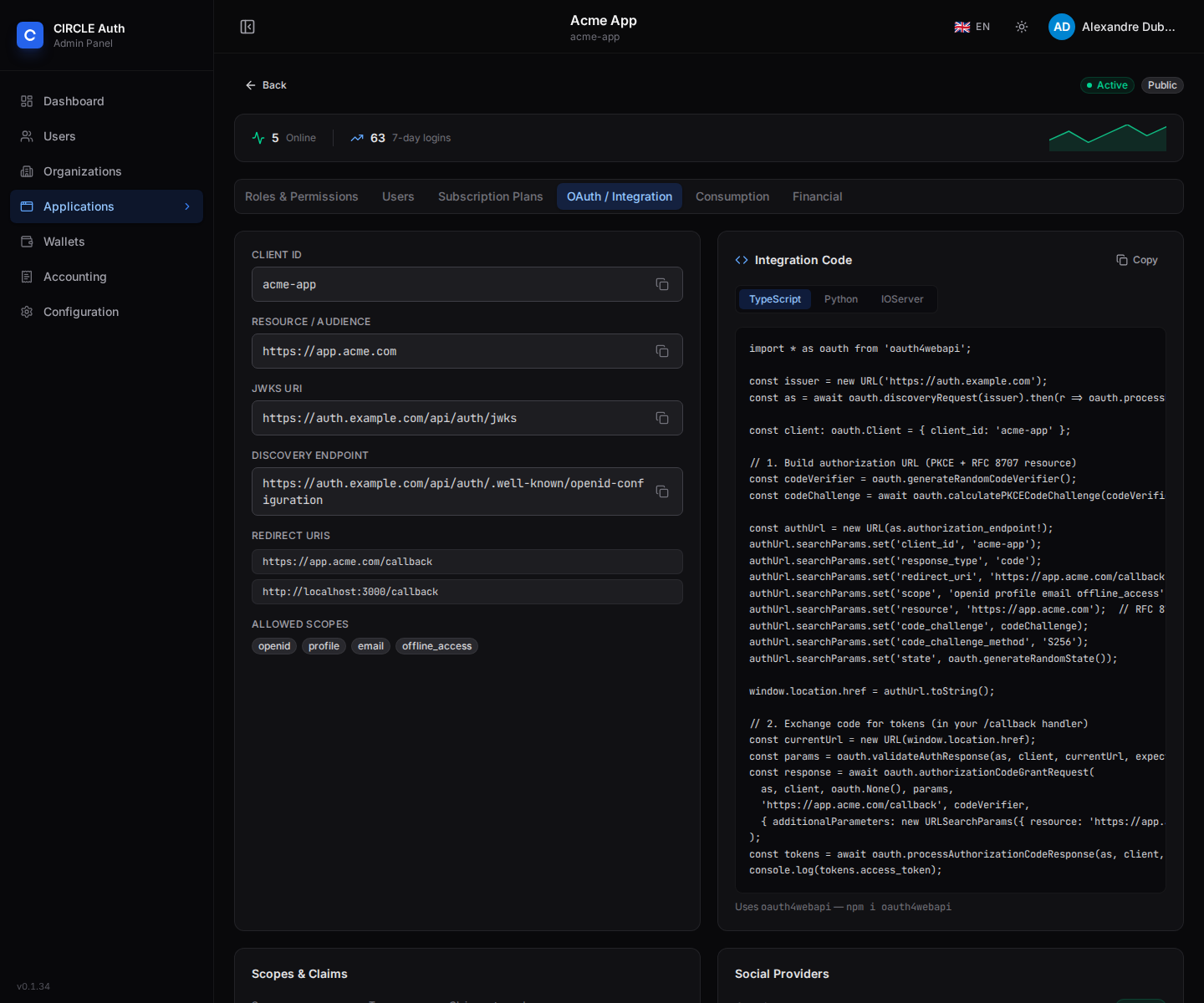
In the admin interface, Applications → Create Application. Once saved, the OAuth / Integration tab shows the client ID, the resource identifier, the endpoints and ready-to-paste code:
Or with the API:
POST /api/admin/applications
Content-Type: application/json

{
  "name": "Acme App",
  "slug": "acme-app",
  "url": "https://app.acme.com",
  "isPublic": false,
  "redirectUris": ["https://app.acme.com/callback"],
  "allowedScopes": ["openid", "profile", "email", "roles", "permissions", "features", "org", "offline_access"],
  "skipConsent": true,
  "allowRegister": false
}
What matters:
slugis yourclient_id.urlis the application's resource identifier. A JWT access token is issued only when the authorization request carriesresource=<url>(or the instance adds it, see the callout in step 3); itsaudis then that URL. It is also added to the allowed CORS origins.redirectUrisare matched exactly. Any otherredirect_uriis refused.skipConsent: turn it on for first-party applications; leave it off to show a consent screen.- A confidential application receives a
clientSecretonce, at creation. Store it in your secret manager; rotating it isPOST /api/admin/applications/:id/rotate-secretand revokes the tokens issued with the previous secret. - To let a user sign out of every application from yours, turn on
enableEndSession(see Sign out). To be told when the session ends elsewhere, setbackchannelLogoutUri(see Back-channel logout).
The full field list is in Managing applications.
2. Give users access, roles and plans
Unless the application is public (isPublic: true) or has allowRegister: true, a user can only obtain a token for an application they have been granted: the request is refused otherwise, so your code never has to check "does this user belong here". A public or open-registration application instead gives access to any account on its first token request, and assigns the default role and plan. A user whose access was revoked stays refused.
- Define the roles and permissions of your application. Mark one role as
isDefaultto hand it to every user you grant access to. - Optionally define subscription plans: their
featuresend up in the token. - Grant users:
POST /api/admin/applications/:id/userswith{ "userId", "roleId?" }, or the bulk variant…/users/bulk. WithallowRegister: true, users can also create their own account from your sign-in page.
The access record takes a single roleId, so give each user one role per application. If you need several levels, model them as roles whose permissions add up.
3. Sign users in
Use a maintained OIDC library; nothing here is specific to auth-service. The only points to respect are the discovery URL (/.well-known/openid-configuration at the issuer root), PKCE with S256, and the resource parameter.
With oauth4webapi (v3 API):
import * as oauth from "oauth4webapi";

const issuer = new URL("https://auth.example.com");
const as = await oauth
  .discoveryRequest(issuer)
  .then((r) => oauth.processDiscoveryResponse(issuer, r));

const client: oauth.Client = { client_id: "acme-app" };
const redirectUri = "https://app.acme.com/callback";
const resource = "https://app.acme.com"; // the application's url

// Step 1: send the user to auth-service
const codeVerifier = oauth.generateRandomCodeVerifier();
const state = oauth.generateRandomState();
sessionStorage.setItem("pkce", JSON.stringify({ codeVerifier, state }));

const authorizeUrl = new URL(as.authorization_endpoint!);
authorizeUrl.searchParams.set("client_id", client.client_id);
authorizeUrl.searchParams.set("response_type", "code");
authorizeUrl.searchParams.set("redirect_uri", redirectUri);
authorizeUrl.searchParams.set("scope", "openid profile email roles permissions features offline_access");
authorizeUrl.searchParams.set("resource", resource);
authorizeUrl.searchParams.set("code_challenge", await oauth.calculatePKCECodeChallenge(codeVerifier));
authorizeUrl.searchParams.set("code_challenge_method", "S256");
authorizeUrl.searchParams.set("state", state);
location.href = authorizeUrl.toString();

// Step 2: in the /callback page
const saved = JSON.parse(sessionStorage.getItem("pkce")!);
const params = oauth.validateAuthResponse(as, client, new URL(location.href), saved.state);
const response = await oauth.authorizationCodeGrantRequest(
  as,
  client,
  oauth.None(),
  params,
  redirectUri,
  saved.codeVerifier,
  { additionalParameters: new URLSearchParams({ resource }) },
);
const tokens = await oauth.processAuthorizationCodeResponse(as, client, response);
// tokens.access_token, tokens.id_token, tokens.refresh_token
The same flow on a server, with the secret sent as HTTP Basic. Only the client authentication changes:
const client: oauth.Client = { client_id: "acme-app" };
const clientAuth = oauth.ClientSecretBasic(process.env.ACME_CLIENT_SECRET!);

const response = await oauth.authorizationCodeGrantRequest(
  as,
  client,
  clientAuth,
  params,
  redirectUri,
  codeVerifier,
  { additionalParameters: new URLSearchParams({ resource }) },
);
Keep the tokens on the server and give the browser an opaque session cookie (the BFF pattern): access tokens then never reach JavaScript.
from authlib.integrations.httpx_client import AsyncOAuth2Client

client = AsyncOAuth2Client(
    client_id="acme-app",
    client_secret=ACME_CLIENT_SECRET,
    scope="openid profile email roles permissions features offline_access",
    redirect_uri="https://app.acme.com/callback",
    code_challenge_method="S256",
    token_endpoint_auth_method="client_secret_basic",
)
meta = (await http.get("https://auth.example.com/.well-known/openid-configuration")).json()
url, state = client.create_authorization_url(
    meta["authorization_endpoint"], code_verifier=verifier, resource="https://app.acme.com"
)
# keep `state` and `verifier` in the user's server-side session, then in the callback:
token = await client.fetch_token(
    meta["token_endpoint"], authorization_response=callback_url, state=state,
    code_verifier=verifier, resource="https://app.acme.com",
)
resource, the access token is an opaque string that only the introspection endpoint can read. Always send the application's url as resource to get a JWT your API can verify locally. (An instance started with DEFAULT_AUDIENCE enabled, as the Okta and Keycloak compatibility profiles do, adds the application's url when a request carries no resource.)What the access token contains
{
  "iss": "https://auth.example.com",
  "sub": "<user id>",
  "aud": ["https://app.acme.com", "https://auth.example.com/api/auth/oauth2/userinfo"],
  "azp": "acme-app",
  "client_id": "acme-app",
  "email": "alice@example.com",
  "email_verified": true,
  "name": "Alice Smith",
  "roles": ["admin"],
  "permissions": [],
  "features": {},
  "plan": "free",
  "scope": "openid profile email roles permissions features offline_access",
  "sid": "<session id>",
  "iat": 1792835793,
  "exp": 1792839393,
  "jti": "…"
}
The header is {"typ":"at+jwt","alg":"EdDSA","kid":"…"}. The token lives for one hour. The claims present depend on the granted scopes: roles, permissions, features and plan need their own scope, and org_id needs the org scope. Claims are described in OIDC claims.
4. Verify tokens in your API
Verify the signature locally against the key set, with any JOSE library. Never decode a token without verifying it.
import { createRemoteJWKSet, jwtVerify } from "jose";

const JWKS = createRemoteJWKSet(new URL("https://auth.example.com/api/auth/jwks"));

export async function verifyAccessToken(token: string) {
  const { payload } = await jwtVerify(token, JWKS, {
    algorithms: ["EdDSA"],
    issuer: "https://auth.example.com",
    audience: "https://app.acme.com", // matches when the array `aud` contains it
  });
  return payload;
}
import jwt  # pip install "pyjwt[crypto]"

jwks = jwt.PyJWKClient("https://auth.example.com/api/auth/jwks")

def verify_access_token(token: str) -> dict:
    key = jwks.get_signing_key_from_jwt(token)
    return jwt.decode(
        token, key.key,
        algorithms=["EdDSA"],
        issuer="https://auth.example.com",
        audience="https://app.acme.com",
    )
spring:
  security:
    oauth2:
      resourceserver:
        jwt:
          issuer-uri: https://auth.example.com
          jws-algorithms: EdDSA
Spring reads /.well-known/openid-configuration and the JWKS from the issuer. Its default accepted algorithm is RS256, hence jws-algorithms; Ed25519 verification needs the Tink library on the classpath. Add an audience validator for your url.
Checklist for a resource server:
- Accept only the algorithm of the instance (
EdDSAby default,RS256with a compatibility profile), and pinisstoBETTER_AUTH_URLexactly (no trailing slash). - Require
audto contain your own URL: a token minted for another application must be refused. - Cache the key set by
kid, refetch when you meet an unknownkid(keys rotate monthly, the previous key stays published for another month). - Use
azpif only some client applications may call your API. - Do not call
/userinfoper request: everything you need is in the token.
5. Authorize with the claims
const payload = await verifyAccessToken(bearer);

const roles = (payload.roles as string[]) ?? [];
const permissions = (payload.permissions as string[]) ?? [];
const features = (payload.features as Record<string, unknown>) ?? {};

// "documents" = read, "documents.write" = write
if (!permissions.includes("documents.write")) throw new Forbidden();

// plan and feature flags
if (features.apiAccess !== true) throw new PaymentRequired();

// multi-tenant data: scope every query by the organization
const orgId = payload.org_id as string | undefined; // request the `org` scope
Roles, permissions and plan changes apply to the next token, up to one hour later for a token already issued. Keep sessions short, or refresh often, where that matters.
6. Sign out
Two levels, to choose consciously:
- Local sign-out: clear your own session and tokens, and revoke your refresh token with
POST /api/auth/oauth2/revoke(form-encodedtokenandtoken_type_hint=refresh_token, with the same client authentication as the token endpoint). The central session is untouched: the user stays signed in to auth-service and to the other applications, and no back-channel notification is sent. This is the default and the right choice for most applications. - Global sign-out (OIDC RP-initiated logout): send the browser to
GET /api/auth/oauth2/end-session. It ends the central session for all applications; there is no per-application variant. It needsenableEndSession: trueon your application.
| Query parameter | Meaning |
|---|---|
id_token_hint | The ID token you received at sign-in. It must be signed by this instance, have your client_id as aud, and carry sid and sub. Its expiry is not checked |
client_id | Your client_id. Optional when id_token_hint is sent |
post_logout_redirect_uri | Where to send the browser afterwards. It must match, exactly, an entry of the application's postLogoutRedirectUris |
state | Added as a state query parameter to the redirect |
GET /api/auth/oauth2/end-session?id_token_hint=<id_token>&client_id=acme-app&post_logout_redirect_uri=https://app.acme.com/&state=<state>
What happens:
- With a valid
id_token_hintfor the session the browser currently holds (or for a session the browser no longer holds), that session is ended right away. - Without a valid
id_token_hint, or when the hint names another session than the browser's current one, the user gets a confirmation page instead and the session ends only once they confirm. - The browser is redirected to
post_logout_redirect_urionly when it exactly matches a registered entry. Otherwise the session still ends and a plain confirmation page is shown. When you create an application with aurland nopostLogoutRedirectUris,<url>/is registered for you.
Whichever way the central session ends (end-session, or a sign-out in auth-service itself), the service:
- revokes the access tokens bound to that session. A JWT that your API verifies locally is not re-checked and stays valid until its
exp(one hour); introspection and/userinfodo report it as inactive; - revokes the refresh tokens that have no
offline_accessscope, and keeps theoffline_accessones on purpose. A refresh token is only issued whenoffline_accessis granted, so in practice your refresh token survives the logout: delete or revoke it yourself if it must not outlive the user's session; - sends a logout token to the
backchannelLogoutUriof every application that holds tokens bound to that session, including the one that started the sign-out (see Back-channel logout).
The request that ends the session waits for these deliveries (at most 5 seconds each): a slow back-channel endpoint delays the sign-out response.
7. Back-channel logout
The session is central: a user who signs out anywhere ends it for every application, and a post_logout_redirect_uri only covers the browser that made the call. To be told when the session ends, whichever device or application ended it, implement OIDC Back-Channel Logout. The service then makes a server-to-server POST to your endpoint.
Set up
- Have an administrator set
backchannelLogoutUrion your application: in the admin interface, the Advanced step of the application form (Back-channel logout endpoint), or thebackchannelLogoutUrifield ofPOST/PATCH /api/admin/applications. The admin API accepts only a publichttps://URL (no credentials, no fragment, no loopback or private address), and the auth-service server itself must be able to reach it.backchannelLogoutSessionRequiredis optional and does not change what is sent: every logout token carries bothsubandsid. - At sign-in, store the
sidandsubclaims of the ID token next to your local session.sidis present in ID tokens only when the application hasenableEndSessionor abackchannelLogoutUri. If an ID token has nosid, no logout could ever reach that session: treat it as a configuration error. - Expose the endpoint. It is called with no cookie and no credentials, so it must not sit behind your session or CSRF protection.
The request your endpoint receives
POST /backchannel-logout HTTP/1.1
Content-Type: application/x-www-form-urlencoded
Accept: application/json

logout_token=<JWT>
The JWT header has typ: logout+jwt; it is signed with the same key set as ID tokens. Its payload:
{
  "iss": "https://auth.example.com",
  "aud": "acme-app",
  "sub": "<user id>",
  "sid": "<session id>",
  "iat": 1792835793,
  "exp": 1792835913,
  "jti": "…",
  "events": { "http://schemas.openid.net/event/backchannel-logout": {} }
}
aud is your client_id and exp is 120 seconds after iat. There is no nonce.
What your endpoint must do
Validate the token before acting on it. Reject it with 400 if any check fails:
- Verify the signature against the JWKS (
/api/auth/jwks), with the algorithm of your instance pinned andnonerefused. issis the issuer exactly, andaudis yourclient_id.iatis present andexpis not in the past.- The header
typislogout+jwt. eventsis an object that contains the keyhttp://schemas.openid.net/event/backchannel-logout.- There is no
nonceclaim. jtihas not been seen before. Keep eachjtiuntil itsexp, and refuse a replay.sid(orsub) is present. This service always sends both.
Then:
- End every local session whose stored
sidequals the token'ssid. If you also keep per-user state, usesub. - Answer
200or204within 5 seconds. The service makes a single attempt, never retries, does not follow redirects, and only logs any other status or a timeout as a delivery failure.
Make the handler idempotent
The service posts to every application that holds tokens bound to the ended session, and that includes the application that started the sign-out. When your own global sign-out (end-session) triggers it, your local session is probably already gone by the time the logout token arrives. Answer 200 anyway when no session matches, as long as the token is valid and unused.
Tokens and grants after the logout
The service has already revoked the access tokens bound to the session. A JWT your API verifies locally stays valid until its exp; use introspection if you need the revocation to take effect at once. Refresh tokens that were issued with offline_access (which, in practice, is every refresh token) are not revoked: the application decides what to do with its own grant. Delete the stored refresh token, and revoke it with POST /api/auth/oauth2/revoke, unless you deliberately keep it for background work.
Worked example
The gine project implements this recipe as a confidential Python (Authlib) backend-for-frontend: the endpoint is POST /api/v1/auth/backchannel-logout in services/orchestrator/app/api/auth_routes.py, and the checks above are in verify_logout_token of services/orchestrator/app/api/oauth_client.py.
8. Keep the session alive
Request offline_access to receive a refresh token, then exchange it before the access token expires:
POST /api/auth/oauth2/token
Authorization: Basic <base64(client_id:client_secret)>   # omit for a public client, send client_id in the body instead
Content-Type: application/x-www-form-urlencoded

grant_type=refresh_token&refresh_token=<token>&resource=https://app.acme.com
Store the refresh token returned by each call. Sending resource (and optionally a narrower scope) restricts the new access token to that audience; it can never widen what was granted at sign-in.
9. Service-to-service calls
A confidential application can authenticate as itself, with no user:
POST /api/auth/oauth2/token
Authorization: Basic <base64(client_id:client_secret)>
Content-Type: application/x-www-form-urlencoded

grant_type=client_credentials&resource=https://other-api.example.com
The token carries scope: m2m, sub equal to your client_id, and no user claims. The target API must be your own url or the url of a registered application listed in your allowedResources. Use it, for example, to record consumption from your backend. Wallet scopes (wallet:read, wallet:debit) and the billing scope (billing:read, to read your users' subscription, metered usage and invoices — see the Stripe integration) are granted by a superadmin only.
Troubleshooting
| Symptom | Cause |
|---|---|
Error page invalid_redirect | redirect_uri does not match a registered URI exactly (scheme, host, port, path) |
invalid_request: pkce is required for public clients (or … for this client) | Missing code_challenge / code_challenge_method=S256. PKCE is required for every application, confidential ones included |
invalid_target: requested resource … is not configured or client … is not linked to resource(s) … | resource is not the url of any application, or it is not your application's own url nor one of its allowedResources |
invalid_client … cannot use client_secret_post | A confidential client authenticates with one method: HTTP Basic by default, or the body with TOKEN_ENDPOINT_AUTH_METHOD=post (see Compatibility profiles) |
| The access token is not a JWT | The authorization request had no resource (and the instance does not set DEFAULT_AUDIENCE) |
| Signature errors in your API | The verifier expects another algorithm than the instance's JWT_PRIMARY_ALG (EdDSA by default, RS256 with the Okta, Auth0 and Keycloak profiles) |
aud mismatch | aud is an array: use a library option that checks containment, and compare with the application url |
| Browser blocked by CORS on the token endpoint | The page origin is not the origin of a registered application url nor in CORS_ORIGINS |
| No token after sign-in for a valid user | The user has no active access to the application, or MFA is required by the application and not enabled on the account |
Next steps
- Protected resources and CORS: how audiences and origins are derived
- Custom templates: brand the sign-in, registration and e-mails per application
- LiteLLM gateway and credit wallet in an application: let your application call LLMs on behalf of its users
- IOServer OIDC and MCP servers: framework-specific variants