LiteLLM gateway
auth-service ships an optional LiteLLM proxy behind
the Docker Compose profile llm. Applications obtain an auth-service access
token for the gateway and call LiteLLM with it; no per-user API key is issued.
Usage is billed against the user's wallet: see Credit and billing below and the programme plan.
How authentication works
LiteLLM's built-in JWT auth is an Enterprise feature, so the gateway validates
tokens in litellm/custom_auth.py (wired through general_settings.custom_auth):
- the signature is checked against the auth-service JWKS (
/api/auth/jwks, EdDSA or RS256 depending onJWT_PRIMARY_ALG); an unknownkidtriggers one refetch per 30 seconds, so key rotation is picked up; issmust equalBETTER_AUTH_URLandaudmust containLITELLM_PUBLIC_URL;client_credentialstokens are rejected (they carry no user:subequalsazp);- the user is the token
sub, the calling application isazp. auth-service resolves the plan the user holds for that application (their active subscription, or the application's default plan) and the request runs under the team of that plan (<applicationSlug>:<planSlug>, see below): a token whose user holds no plan, or whose plan has no team, is refused with403; - a user token only reaches the LLM and MCP routes (
/v1/chat/completions,/v1/models,/mcp,/{server}/mcp…): administration routes such as/key/generate,/user/new,/team/newor/spend/logsanswer403. Without this, any signed-in user could mint LiteLLM virtual keys that outlive their auth-service access, or create users and teams; LITELLM_MASTER_KEYstill works for administration;- a token starting with
sk-(a LiteLLM virtual key, such as the one the admin interface uses once signed in, or a service key an administrator issues) is left to LiteLLM to validate. It is service traffic, not billed per user.
The gateway is registered as an application (litellm) whose url is the
resource identifier (RFC 8707). A client application receives a JWT only when it
sends resource=<LITELLM_PUBLIC_URL> and lists that URL in its
allowedResources. Public (PKCE) and
confidential applications are both supported.
Setup
Nothing has to be generated or registered by hand: the litellm-setup service
of the compose file does it at every start. The only setting to provide is the
public URL of the gateway (the token audience), in .env:
LITELLM_PUBLIC_URL=https://llm.example.com
COMPOSE_PROFILES=llm
Then start the stack:
docker compose up -d
litellm-setup(the auth-service image, a one-shot container) waits for auth-service to be healthy, then- creates the
litellmdatabase next to the auth one if it is missing (LITELLM_DB_ADMIN_URL, set by the compose file); - copies the gateway config (
litellm/config.yaml,custom_auth.py,circle_wallet.py, shipped inside the image) into a shared volume, so the config always matches the auth-service version whose tokens it validates; - generates
LITELLM_MASTER_KEYandLITELLM_SALT_KEYonce, unless you supplied them in.env(a supplied value wins and is stored); - signs in with
ADMIN_EMAIL/ADMIN_PASSWORDand registers thelitellmapplication (whoseurlis the token audience) and thelitellm-walletmachine client with thewallet:debitandwallet:readscopes, and keeps that client's secret; a missing or rejected secret (for example after recreating the database) is rotated; - stores the three secrets in
secrets.envon the shared volume, which onlylitellmreads.
- creates the
litellmstarts once the setup succeeded.litellm-provision(also a one-shot) starts oncelitellmis healthy and gives auth-service its team-management key (see One gateway team per plan).
It is safe to re-run and never regenerates a stored secret. Never change the
salt key once models have been added: it encrypts the provider credentials.
After the secret of litellm-wallet was rotated, recreate litellm
(docker compose up -d --force-recreate litellm) so it picks up the new one.
The setup signs in as the administrator, so that account must not require MFA
the first time it runs; it fails with a clear message otherwise (docker compose logs litellm-setup). Once a run has completed (keys, wallet secret and, with the
sign-in on, the SSO secret are stored), enabling MFA on that account no longer
blocks the gateway: the next runs detect it, log a warning and exit successfully
without provisioning anything. A new LITELLM_PUBLIC_URL or --grant is only
applied by a run that can sign in, so use an administrator without MFA for those.
Signing in to the LiteLLM admin interface. litellm-setup also registers the
private application litellm-ui and turns on SSO in LiteLLM: the login page
sends you to auth-service, and your account there is your LiteLLM account (no
more admin and master key: with the sign-in on, no username/password login
reaches the interface, so an auth-service outage does not open a way in). Access is managed in auth-service,
on the application's user list:
- a user without access to
litellm-uicannot sign in; - the application role
adminbecomes LiteLLMproxy_admin;user, or no role, becomes the read-onlyproxy_admin_viewer; - the administrator who ran the setup holds
adminfrom the start; give the others access with the role you want in the application's page of the admin interface.
The whole sign-in configuration (authorize, token and userinfo endpoints, PKCE,
role mapping, PROXY_BASE_URL and AUTO_REDIRECT_UI_LOGIN_TO_SSO) is written by
litellm-setup into secrets.env, next to the client id and secret, and is
refreshed at every start: the litellm service of your compose file needs none of
those GENERIC_* variables, and a copy of an older definition cannot leave the
gateway half-configured.
The configuration shows in LiteLLM under Settings → Admin Settings → SSO
Settings. If you apply the private-interface setup described in
Keeping the admin interface private, the
sign-in is reachable from the administration network only. LiteLLM limits free
SSO to 5 users. Set
LITELLM_SSO_ENABLED=false to turn it off: the master-key login of the
interface then comes back (disable_password_login_when_sso_enabled only acts
while SSO is configured). The master key keeps working on the API
(Authorization: Bearer), which is how pnpm llm:smoke and the administration
scripts (pnpm llm:reconcile, llm:export, llm:import) use it.
Allowing applications. A client application receives a LiteLLM token only if
the gateway URL is in its allowedResources. In the create / edit dialog of the
application, switch on LiteLLM support: it adds the gateway URL (the url of
the litellm application), the Auth Service URL (the url of the auth-service
application, needed to read the user's credit) and the wallet:self:read scope,
and hides them from the resource list and the scope chips; any other resource is
still entered by hand. Switching it off removes the three. The switch is disabled
when the two system applications are missing. From a checkout,
pnpm llm:setup -- --grant=my-app,my-other-app still adds the gateway URL.
Who must be assigned. Users are granted access to the client application
(for example reverse-box), which is what the token policy checks. The system
applications need no assignment: litellm and auth-service are only token
audiences and litellm-wallet is the gateway's own machine client. Only
litellm-ui takes users: the administrators of the LiteLLM interface. System
applications are hidden from the Applications tab of a user's profile; in the
admin Users pages they are hidden too, except that a user assigned to
litellm-ui shows a single LiteLLM entry (its role tells administrator from
viewer).
Reading the keys. You normally do not need them. The master key is what
pnpm llm:smoke and the other administration scripts use (with the admin
interface sign-in through auth-service on, it no longer signs in to the
interface):
docker compose exec litellm sh -c '. /app/gateway/secrets.env; echo $LITELLM_MASTER_KEY'
Running from a checkout instead. pnpm llm:setup registers the litellm
application and the litellm-wallet client against a running auth-service and
writes the secrets to .env (or to LITELLM_STATE_FILE when set); it is the path
used by development setups that run the compose file with a hand-written .env.
It creates the litellm database only when LITELLM_DB_ADMIN_URL is set, and
registers litellm-ui and the admin interface sign-in only when
LITELLM_STATE_FILE is set (as in the compose file).
Verify the whole chain
pnpm llm:smoke
It needs LITELLM_MASTER_KEY and LITELLM_WALLET_CLIENT_SECRET in the
environment (both are in secrets.env; pnpm llm:setup from a checkout puts
them in .env), plus BETTER_AUTH_URL, LITELLM_PUBLIC_URL, ADMIN_EMAIL and
ADMIN_PASSWORD: it signs in as that administrator, so the account must not
require MFA. The smoke test creates two temporary applications (public and
confidential) and a priced mock model, then checks that user tokens are accepted,
that a new plan team is closed until its access group is granted the model, and
that client_credentials, wrong-audience, tampered, malformed and missing tokens
are rejected. It also exercises the wallet API with the gateway credentials and
the billing path (debt, 402, top-up), and deletes the applications and the model
it created. The credit it grants to its temporary user stays in the append-only
ledger.
Production deployment
Deployments that consume the published image only need the compose file and a
.env; no file from the repository has to be copied to the server and no
command has to be run: docker compose up -d provisions the gateway (see
Setup).
- Profiles.
litellm*services belong to thellmprofile andredisto theredisprofile, so a plaindocker compose upignores them. Activate them durably in the.envnext to the compose file:COMPOSE_PROFILES=llm,redis - Health check.
litellm-setupandlitellmwait forauth-serviceto behealthy: the auth-service container must define ahealthcheck(as indocker-compose.yml), otherwise compose stops withhas no healthcheck configured. - Setup service. Give
litellm-setupthe variables it needs:BETTER_AUTH_URL,ADMIN_EMAIL,ADMIN_PASSWORD,LITELLM_PUBLIC_URL,AUTH_SERVICE_URL(the internal address of auth-service, for examplehttp://auth:3001) andLITELLM_STATE_FILE=/config/secrets.env, with the shared volume mounted on/config. Copy thelitellm-setupandlitellmdefinitions ofdocker-compose.yml;litellm's entrypoint readssecrets.env. - Team provisioner. Also copy
litellm-provisionand thelitellm_provisionervolume, and give auth-serviceLITELLM_URL(the internal address oflitellm) with the volume mounted read-only on/run/litellm-provisioner(LITELLM_PROVISIONER_KEY_FILE). WithoutLITELLM_URL, applications get no team and their calls answer403; with it but without the key, saving an application with LiteLLM support fails withSRV_004. - Routing. Expose
litellmthrough the reverse proxy on the host used asLITELLM_PUBLIC_URL(with Traefik: router and TLS labels, service port4000) and do not publish port4000on the host. Fetch the signing keys over the Docker network (JWT_PUBLIC_KEY_URL=http://<auth-service>:3001/api/auth/jwks) and keep the public URLs forJWT_ISSUERandJWT_AUDIENCE. - Secrets. Nothing to invent: they are generated on first start and kept on
the shared volume. To choose them yourself, set
LITELLM_MASTER_KEYandLITELLM_SALT_KEYin.env:sk-followed by 64 hex characters (LiteLLM requires thesk-prefix on the master key), for exampleecho "sk-$(openssl rand -hex 32)". The wallet client secret is always issued by auth-service.
Credit and billing
litellm/circle_wallet.py ties the gateway to the user's wallet. It only
concerns requests authenticated with an auth-service user token; the master key,
the admin UI and LiteLLM virtual keys are service traffic and are not billed.
Before a call, the hook asks the wallet API whether the user can spend. With
no credit (a zero or negative balance) the call is refused with HTTP 402
(insufficient_credit). The answer is kept for 5 seconds
(WALLET_BALANCE_TTL_S), so a top-up is seen within that delay.
After a successful call (LLM completion, embedding… or MCP tool call), the
hook reports the provider cost to the wallet API, which prices it and debits the
user: cost in USD × exchange rate × (1 + margin / 100), rounded up to a
micro-euro (never rounded down to zero for a positive cost). The gateway holds no pricing rule: a superadmin changes the
rate and the margin in the Wallets page of auth-service (saved changes apply to
the next call, keep their author and reason, and charges already made are not
touched; WALLET_USD_TO_EUR_RATE and WALLET_MARGIN_PERCENT only provide the
starting values). The price of each model and tool is LiteLLM's: set it there, and
keep any margin in one place, preferably auth-service, since LiteLLM's own
provider margin would add up with it unseen. The ledger row records the raw quantities
(model, tokens, or MCP server and tool), the dollar cost, the rate and the margin,
and the calling application, so a charge can be audited and re-priced.
- Models without a price are free. LiteLLM computes the cost from its price
list; a local vLLM model has none. Give it one in its model settings
(
input_cost_per_token,output_cost_per_token), or its calls cost nothing. - MCP tools. LiteLLM bills a tool call only if the server declares a cost in
its
mcp_info.mcp_server_cost_info(see LiteLLM's MCP documentation for the fields); the hook reports it in dollars like any other cost. - MCP access. An application reaches only the MCP servers allowed to the plan's team (see above); with none, no server is reachable.
- Debt. Usage reported after a call is always recorded, even beyond the balance: the balance goes negative, blocks the next calls, and is repaid by the next top-up.
When auth-service is unreachable, calls continue for a user whose balance was
read in the last minute (WALLET_STALE_BALANCE_S) and are refused with 503
otherwise: no credit information, no spending. Debits are written to disk
(/var/lib/circle-wallet/pending, a volume) before being sent and retried with
a growing delay, also after a restart and without any new traffic. Each debit has
its own generated idempotency key, so a retry can never charge twice, and nothing
the client sends (such as an x-litellm-call-id header) can make two calls share
one. A debit the wallet
rejects for good (unknown user, conflicting replay) is set aside in dead/ with an
error in the logs: look there if a balance seems too high.
Per-application plans and subscriptions are unchanged: the wallet covers the LLM and MCP usage only.
Limits per user
The credit is checked before a call and billed after it, so a burst of calls on a
small balance can overshoot into debt. Three ceilings per user, enforced by the hook
in each gateway process, bound it (HTTP 429 beyond them):
WALLET_MAX_REQUESTS_PER_MINUTE(default120): billable calls, MCP included;WALLET_MAX_SPEND_PER_MINUTE_USD(default5): provider cost, in dollars as LiteLLM reports it, billed over the last minute. It caps how fast a burst of expensive calls can run up a debt; raise it if your users legitimately run costly models in quick succession;WALLET_MAX_CONCURRENT_CALLS(default8): model calls in progress. A slot is released when the call completes, so keep it at2or more: the completion event can arrive just after the response.
A debt stays small, then blocks every further call until the next top-up. It is not strictly bounded: calls already running when the balance reaches zero still complete and are billed in full (see decision D33 of the plan).
Checking the gateway against the wallet
pnpm llm:reconcile        # the last 24 hours
pnpm llm:reconcile 72     # the last 72 hours
The script compares the gateway's spend logs with the wallet's usage debits and exits non-zero on any difference:
UNBILLED: a billable call the wallet never charged (look in the gateway'sdead/spool directory and its logs);MISMATCH: the same call with another user or provider cost;ORPHAN: a charge with no gateway call behind it;DUPLICATE: several charges share one call id: a double charge, or a client reusing thex-litellm-call-idheader (each call is still billed, but someone is probing). The smoke test does it on purpose.
Anything from the last 10 minutes is left out: a debit may still be waiting in the
retry spool and the gateway writes its spend logs in delayed batches. Only calls
authenticated with a user token are compared; a LiteLLM virtual key tied to a
user would show up as UNBILLED.
The gateway also logs, at every retry pass, how many debits are stuck or were
refused for good (dead/); watch for these lines. Administrator balance changes
and every usage debit are logged by auth-service without any token or secret.
Where users and administrators see it
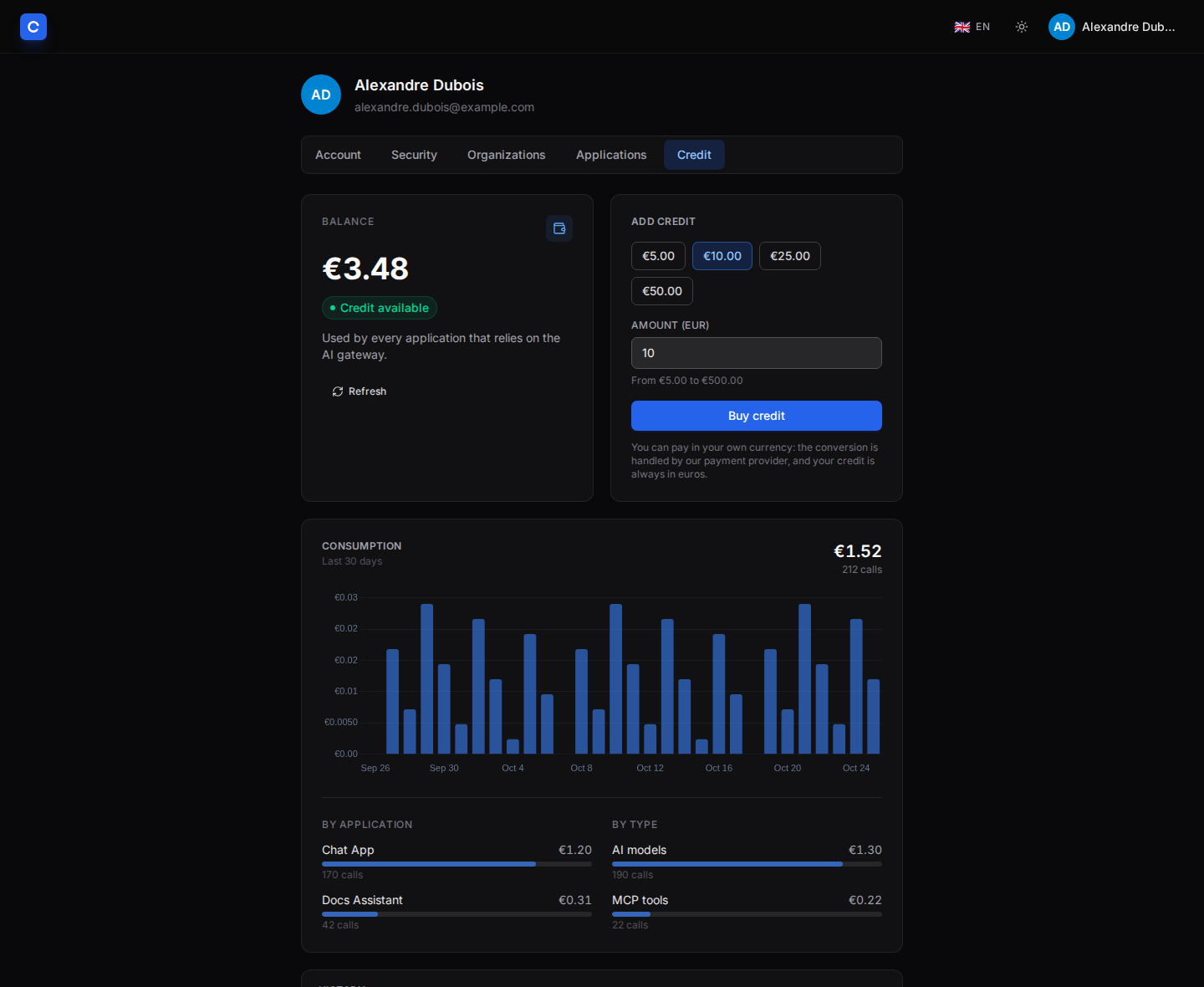
- Users: the Credit tab of the profile page shows the balance, a 30-day spend chart stacked by model with its breakdown by application, type and model, a table of daily consumption (each day opens a detail by application and model), and the top-up form (or a prompt to ask an administrator while online payment is not configured). The page refreshes itself every 15 seconds, so a call made in an application shows up without reloading.
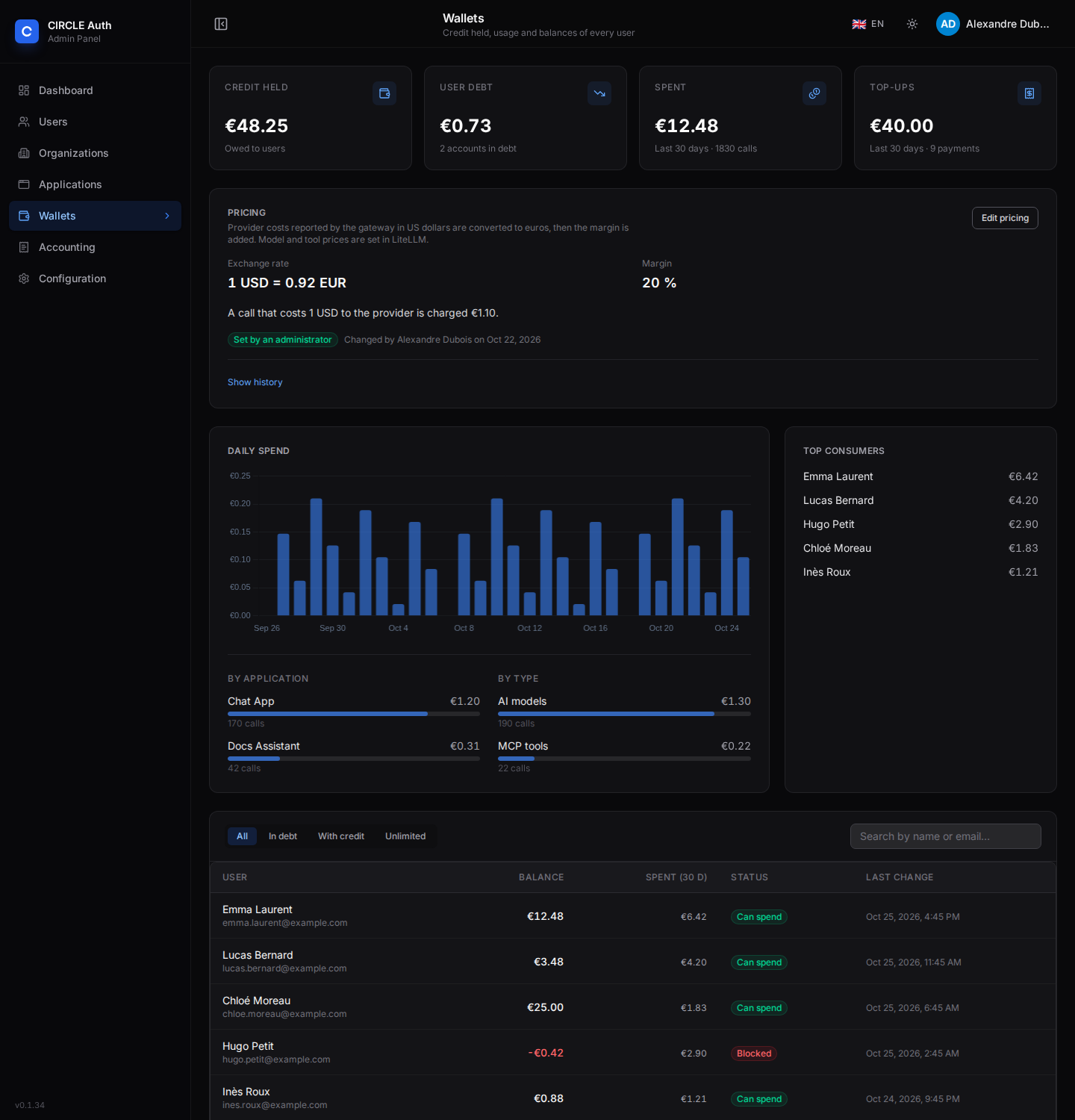
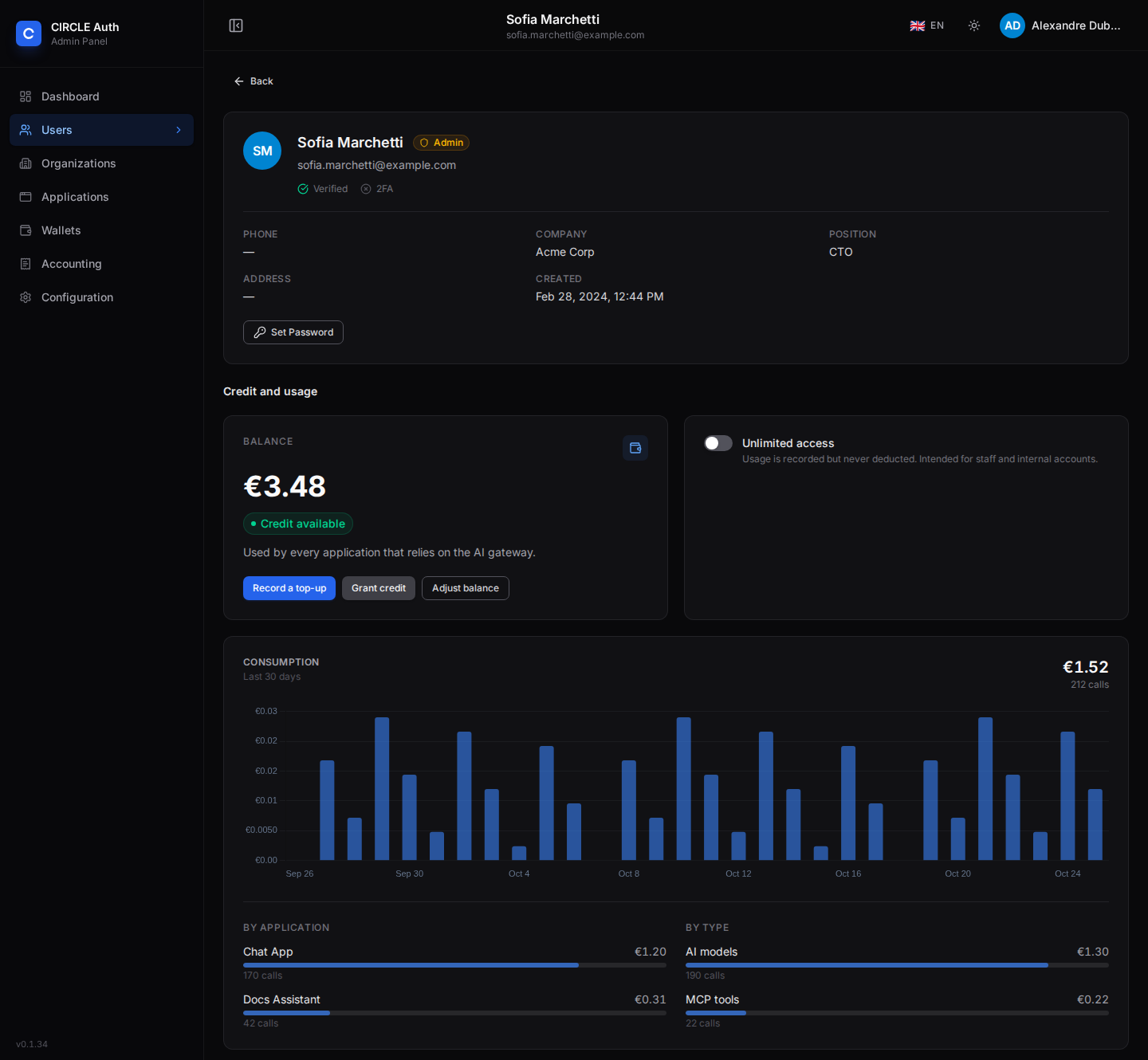
- Administrators: the Wallets page lists every wallet (filter by debt, credit or unlimited access) with platform totals and the top consumers. The user page has a credit section; only superadmins can record a top-up, grant credit, adjust the balance or toggle unlimited access, and each change is audited.
- Accounting journal: the Accounting page lists every top-up, grant, refund, adjustment, unlimited-access change and subscription plan change in one place, newest first, with who did it and why. Filter by user, action type, application and date range.
- Dashboard: credit held, user debt and spend cards, refreshed on the
wallet.changedevent.
Calling the gateway from an application
An application signs the user in through auth-service, then calls LiteLLM with the access token as a bearer, like any OpenAI-compatible endpoint:
- Allow the application to request the gateway: add the gateway URL to its
allowedResources(orpnpm llm:setup --grant=<slug>). - Run the authorization-code flow (PKCE for a public application) with
resource=<LITELLM_PUBLIC_URL>so that the access token is a JWT for the gateway. - Call
POST <gateway>/v1/chat/completionswith the access token in theAuthorizationheader. Handle402(no credit) by sending the user to their wallet. - To read the wallet server-side with the same user, request a second
user-bound token for auth-service itself: keep the application linked to
resource=<BETTER_AUTH_URL>, request the scopewallet:self:read, and callGET /api/user/wallet,/transactions,/stats,/usageor/topup-optionswith that bearer token. The token must be a JWT whoseaudcontainsBETTER_AUTH_URL; a JWT minted for LiteLLM is rejected there. - When using refresh tokens, keep sending
resource=<BETTER_AUTH_URL>on the refresh grant that should keep wallet API access.
Users top up their own credit from the Credit tab of their profile page (Stripe, when STRIPE_SECRET_KEY is set); otherwise a superadmin records the credit with POST /api/admin/wallets/users/:userId/topups (with the invoice reference). The full application-side walkthrough, error handling included, is in LiteLLM gateway and credit wallet in an application.
Keeping the admin interface private
The admin UI (/ui), the management API (/key, /model, /team…), /docs
and /health should not be reachable from the Internet. With Traefik, publish
two routers on the gateway host: a high-priority one for the client routes, and
a catch-all restricted to the administration network. Anything not listed in the
client router stays private by default, including routes added by a future
LiteLLM version.
labels:
  - traefik.enable=true
  - traefik.http.services.litellm.loadbalancer.server.port=4000

  # Client routes (LLM API + MCP): open.
  - traefik.http.routers.litellm.rule=Host(`llm.example.com`) && PathRegexp(`^/(v1|chat|completions|embeddings|models|responses|images|audio|rerank|moderations|files|batches|anthropic|mcp|mcp-rest)(/.*)?$$|^/[^/]+/mcp(/.*)?$$`)
  - traefik.http.routers.litellm.priority=100

  # Everything else (UI, management API, docs, health): administration network only.
  - traefik.http.routers.litellm-admin.rule=Host(`llm.example.com`)
  - traefik.http.routers.litellm-admin.priority=1
  - traefik.http.routers.litellm-admin.middlewares=litellm-admin
  - traefik.http.middlewares.litellm-admin.ipallowlist.sourcerange=10.1.0.0/24
(Add the entrypoints and tls labels of your setup to both routers. $$ is
the compose escape for a literal $.)
Notes:
- The allow list uses the connection address, never
X-Forwarded-For. Behind a load balancer, enable the PROXY protocol on the entrypoint so that address is the real client's: a forgedX-Forwarded-Foris then ignored. - The client list is an allow list: add a prefix to the first regular expression when a new client route has to be public.
- The master key still works on the client routes: it is a secret, not a network-scoped credential, so keep it out of applications.
- Do not publish port
4000on the host (thedocker-compose.ymlexample publishes it for local use only). - Behind the proxy, LiteLLM only sees the proxy's address. The shipped
config.yamltherefore setsgeneral_settings.trusted_proxy_rangesto the private address ranges (10/8,172.16/12,192.168/16), so the Admin UI sign-in throttle counts each visitor separately instead of locking everyone out together. It also removes LiteLLM's startup warning about it. If other private clients can reach port4000directly, narrow the list to your proxy's network.
With this setup the client routes answer from any address, while the interface and the management routes answer only from the administration network (the allow list itself is Traefik's, configured in your compose file, not in this repository).
One gateway team per plan
Turning on LiteLLM support for an application makes auth-service manage one
team per subscription plan: team id <applicationSlug>:<planSlug> (for
example my-app:free; the plan slug is the plan name lowercased, every run of
other characters becoming -, and two plans whose names give the same slug are
refused), alias <application name> - <plan name>. The team is
what carries everything specific to that plan: the models it may call, its MCP
servers, its agents, its budget and its rate limits.
Each team carries one access group of the same name, created empty. This is where a gateway administrator grants resources: add the models, MCP servers and agents to the access group in the LiteLLM admin interface (Access Groups), and every team that references it gets them. auth-service only makes the team and its (empty) group exist; it never overwrites their contents.
- A new team is closed: it has no model (
no-default-models), so a call answers403 team_model_access_denieduntil an administrator fills the access group. The same holds for MCP servers and agents (a plan with none reaches none). - The team is created before the application (or plan) is saved: if the gateway
cannot do it, the save fails with
SRV_004and nothing changes. Enabling the support on a team that already exists (made by hand, or by an earlier activation) adopts it as is (it gets themanaged_by: auth-servicemarker and its access group is attached); a block placed by an administrator is kept. - Renaming a plan creates the new team (before the rename) and retires the old
one. Turning the support off blocks every team of the application (calls
answer
401, the configuration is kept so that turning it back on restores it). Deleting a plan blocks its team and drops its access group; deleting the application deletes all its teams and groups. A team made by hand is never touched unless it carries themanaged_by: auth-servicemarker in its metadata. - auth-service reconciles at startup and every five minutes (missing plan teams are created, teams of plans that no longer exist are blocked), so a gateway that was down during a change catches up.
- The gateway reads a team at most once a minute: a resource granted, a limit
changed or a team blocked applies within about a minute. A user's plan is
resolved afresh at most every 30 seconds (
GATEWAY_PLAN_TTL_S), so a plan change applies within about that delay.
Resolving the plan is a machine-to-machine call: the gateway authenticates with
the same client as the wallet (litellm-wallet) and the wallet:read scope it
already holds, on
GET /api/internal/gateway/users/:userId/plan?applicationSlug=…. A user with no
active subscription falls back to the application's default plan; auth-service
being briefly unreachable answers 503 (fail closed).
The one-shot litellm-provision service issues auth-service a gateway key that
may only call the team and access-group routes (/team/new, /team/info,
/team/list, /team/update, /team/block, /team/unblock, /team/delete,
/v1/access_group, /v1/access_group/*):
it cannot add models, mint keys or serve LLM calls. It is written to the
litellm_provisioner volume, which only litellm-provision can write and
auth-service reads (LITELLM_PROVISIONER_KEY_FILE). It runs at every start,
keeps a key that still works and replaces one that does not (the previous one is
revoked, a single key exists). Without a deployed gateway (no litellm
application, or no LITELLM_URL) none of this is active.
Providers, models and access groups
Provider secrets are LLM Credentials: a named, reusable credential created in
the LiteLLM admin interface (Models → LLM Credentials) and stored in the
LiteLLM database. It never appears in the repository, and a model references it by
name (litellm_params.litellm_credential_name), resolved at request time — so the
same file re-imports after a rebuild once the credentials are recreated with the
same names (rotation is then a single place).
Models and access groups are declared in a JSON file and applied with the master key:
pnpm llm:export   # writes the current models + access groups to litellm-gateway-config.json
pnpm llm:import   # applies that file (upsert by name; never deletes, never touches teams)
A model entry references its credential by name and carries no secret:
{
  "model_name": "anthropic/claude-opus-5.5",
  "litellm_params": {
    "model": "anthropic/claude-opus-5.5",
    "custom_llm_provider": "custom_openai",
    "api_base": "https://gateway.example.com",
    "litellm_credential_name": "gateway-provider"
  },
  "model_info": { "mode": "chat" }
}
The importer upserts each model (by model_name) and each access group (by name)
and leaves everything else — teams, keys, budgets — untouched, so it is safe to
run after litellm-provision on every rebuild. Models can also be added by hand
in the admin interface; granting them to a plan then means adding them to that
plan's access group.
Variables
| Variable | Default | Description |
|---|---|---|
LITELLM_PUBLIC_URL | — | Public URL of the gateway; access-token audience and url of the litellm application |
LITELLM_URL | LITELLM_PUBLIC_URL | URL the scripts (pnpm llm:smoke, llm:reconcile, llm:export, llm:import) call, when different from the public one |
AUTH_SERVICE_URL | BETTER_AUTH_URL | URL the scripts use to reach auth-service |
LITELLM_MASTER_KEY | generated | LiteLLM admin key. Optional: a value set here is used instead of a generated one |
LITELLM_SALT_KEY | generated | Encrypts provider credentials in the LiteLLM database. Optional, never change it once models exist |
LITELLM_WALLET_CLIENT_SECRET | generated | Secret of the litellm-wallet machine client (client id litellm-wallet) the gateway hook uses to call the wallet API. Issued by auth-service and kept in secrets.env; only needed in the environment of pnpm llm:smoke |
LITELLM_DB_ADMIN_URL | — | On litellm-setup: connection to any database of the postgres server, with a role allowed to create databases; used to create the litellm one. Set by the compose file, unset from a checkout |
LITELLM_SSO_ENABLED | true | On litellm-setup: sign in to the LiteLLM admin interface through auth-service. false turns it off |
LITELLM_STATE_FILE | .env | File where pnpm llm:setup stores the secrets; /config/secrets.env in the litellm-setup container |
WALLET_USD_TO_EUR_RATE / WALLET_MARGIN_PERCENT | — / 0 | Starting values on auth-service (rate: plain decimal with up to 8 decimals; margin: integer 0–1000), see the environment reference; edited afterwards in the Wallets page. An exchange rate must exist somewhere for billing to work |
WALLET_BALANCE_TTL_S, WALLET_STALE_BALANCE_S, WALLET_RETRY_INTERVAL_S | 5, 60, 15 | Optional, on the gateway: balance cache, tolerance when the wallet is unreachable, base retry delay for spooled debits |
WALLET_MAX_REQUESTS_PER_MINUTE, WALLET_MAX_SPEND_PER_MINUTE_USD, WALLET_MAX_CONCURRENT_CALLS | 120, 5, 8 | Optional, on the gateway: per-user ceilings on billable calls per minute, spend per minute (USD) and model calls in progress |
GATEWAY_PLAN_TTL_S | 30 | Optional, on the gateway: how long a resolved user plan/team is reused before auth-service is asked again |
LITELLM_URL (auth-service) | — | Internal URL of the gateway (http://litellm:4000 in the compose file). Enables the plan team management; unset, applications get no team |
LITELLM_PROVISIONER_KEY_FILE | /run/litellm-provisioner/key | Where auth-service reads the gateway key issued by litellm-provision |
LITELLM_PORT | 4000 | Host port published by the litellm service |
LITELLM_IMAGE | ghcr.io/berriai/litellm:v1.105.0 | Pinned image; re-run pnpm llm:smoke before bumping it |
Troubleshooting
| Symptom | Cause |
|---|---|
/authorize redirects with invalid_target | The application does not list the gateway URL in allowedResources |
| Access token is opaque (not a JWT) | The authorization request omitted resource |
401 Invalid or expired access token | Wrong iss/aud (check BETTER_AUTH_URL and LITELLM_PUBLIC_URL), expired token, or JWKS unreachable from the container |
litellm does not start, litellm-setup exited with an error | Read docker compose logs litellm-setup: a missing LITELLM_PUBLIC_URL, ADMIN_EMAIL or ADMIN_PASSWORD, an administrator who requires MFA, or auth-service unreachable at AUTH_SERVICE_URL |
litellm exits at start with WALLET_CLIENT_SECRET must be set | The deployment does not run litellm-setup, or its litellm service does not read secrets.env: use the definitions of docker-compose.yml |
Admin interface sign-in fails on a missing GENERIC_* setting (for example GENERIC_AUTHORIZATION_ENDPOINT), or there is no redirect to the SSO | The gateway started with a secrets.env written by an older litellm-setup, or litellm-setup did not run since the update: re-run it (docker compose up -d litellm-setup) and recreate litellm; check with docker compose exec litellm sh -c '. /app/gateway/secrets.env; echo $GENERIC_AUTHORIZATION_ENDPOINT' |
Saving an application with LiteLLM support fails with SRV_004 | The gateway is down, or litellm-provision has not delivered the key yet: docker compose up -d litellm-provision, then save again |
403 Application '…' grants this user no plan | The user has no active subscription for the calling application and it has no default plan |
403 Application '…' has no team for this plan on this gateway | The plan's team does not exist yet: enable LiteLLM support (or wait for the reconciliation), and check litellm-provision |
503 Could not resolve the plan for this token | auth-service was unreachable: the gateway fails closed rather than guessing a team |
403 team_model_access_denied | The plan's access group has no access to that model yet: add the model to the group in the LiteLLM admin interface (Access Groups) |
litellm-setup reports HTTP 429 | auth-service rate-limits the token endpoint: wait a minute and re-run |
Integrating with IOServer OIDC
Protect an IOServer application with auth-service access tokens using the ioserver-oidc middleware package.
LiteLLM app and wallet
Let your application call LLMs and MCP tools through the LiteLLM gateway on behalf of its users, and understand how the shared credit wallet is consumed and refilled.