LiteLLM gateway and credit wallet in an application
This guide is for developers of an application that lets its users run LLM calls or MCP tools through the LiteLLM gateway. Users sign in once with auth-service; the gateway recognises them from their access token and bills their credit wallet. Your application holds no provider API key and no billing logic.
Read Integrating a third-party application first: registration, sign-in and token verification work exactly the same here. This page adds what is specific to the gateway and to the wallet.
                        1. sign in (resource = your app, gateway, auth-service)
   User ──▶ Your app ─────────────────────────────────────────────▶ auth-service
              │                                                          ▲   ▲
              │ 2. LLM / MCP call, Bearer <gateway token>                │   │
              ▼                                                          │   │ debit, reported by the
          LiteLLM gateway ── 3. may this user spend? ────────────────────┘   │ gateway after each call
              │              (402 when out of credit)                        │
              └──────────────────────────────────────────────────────────────┘
              Your app ── 4. GET /api/user/wallet (balance, canSpend) ──────▶ auth-service
How the wallet works
- One wallet per user, in euros, shared by every application and every call that goes through the gateway. It never expires.
- Amounts are integers in micro-euros (1 EUR =
1000000), sent as strings. - Before each call, the gateway refuses the user if the balance is zero or negative: HTTP 402. After a successful call it reports the provider cost in dollars, and auth-service debits
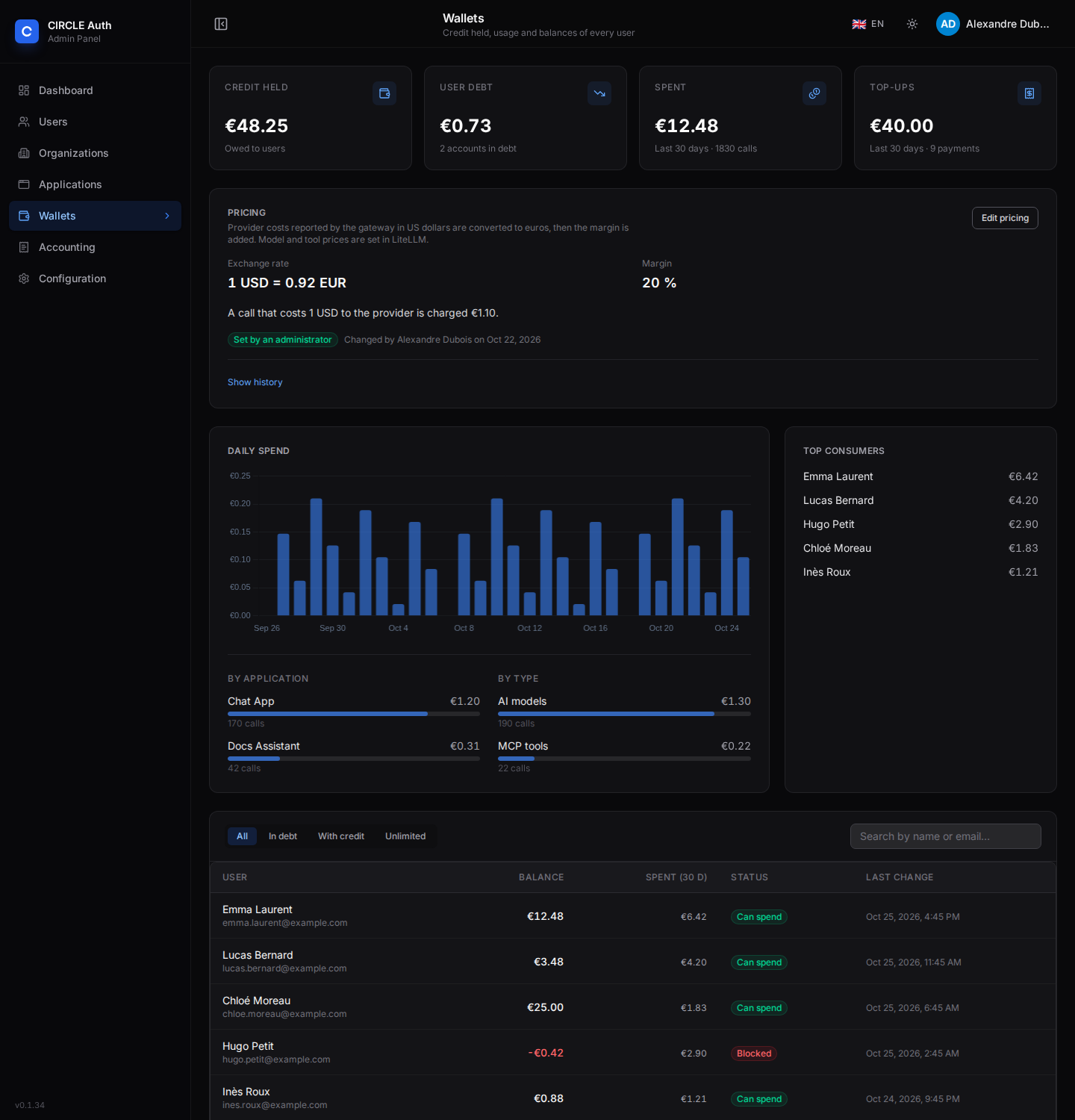
cost × exchange rate × (1 + margin %), rounded up to a micro-euro. - The rate and the margin are set by a superadmin in the Wallets page. The price of each model and tool is set in LiteLLM.
- A call that finishes after the balance reached zero is still billed: the balance goes negative (a debt), blocks further calls, and is repaid by the next top-up.
- Staff and internal accounts can be marked unlimited: usage is recorded but never deducted.
What the operator sets up
Your application needs to be allowed to reach the gateway. The administrator of auth-service does this once:
- In the application's create / edit dialog, switch on LiteLLM support. It adds the gateway URL and the auth-service URL to
allowedResources, adds thewallet:self:readscope, and creates one gateway team per subscription plan (<slug>:<planSlug>, for exampleacme-app:freeoracme-app:premium), each carrying an empty Access Group of the same name. - In the LiteLLM admin interface (Access Groups), fill each plan's group with the models, MCP servers and agents that plan may use — that is what gives the plan its access. A new team is closed: calls answer
403 team_model_access_denieduntil its group has models. Set budgets or rate limits on the team if wanted. - Grant your users access to the application, as for any other. The plan a user holds for your application (their subscription, or the default plan) decides which team their calls run under, so the same application can serve several plans.
The gateway and the audience URLs are described in LiteLLM gateway.
Sign users in for three audiences
Your application needs tokens for up to three different audiences:
Audience (resource) | Used for | Scope |
|---|---|---|
Your application's url | Your own API | those you need (openid, roles…) |
The gateway URL (LITELLM_PUBLIC_URL) | LLM and MCP calls | none in particular |
The auth-service URL (BETTER_AUTH_URL) | Reading the user's wallet | wallet:self:read |
The resource parameter can be repeated on the authorization request. The code exchange then returns a token valid for all of them, and every refresh can narrow it to one audience. This is the least-privilege pattern: store one refresh token, and mint a short-lived token per audience.
const authorizeUrl = new URL(as.authorization_endpoint!);
authorizeUrl.searchParams.set("client_id", "acme-app");
authorizeUrl.searchParams.set("response_type", "code");
authorizeUrl.searchParams.set("redirect_uri", redirectUri);
authorizeUrl.searchParams.set("scope", "openid profile email roles offline_access wallet:self:read");
authorizeUrl.searchParams.append("resource", "https://app.acme.com");      // your API
authorizeUrl.searchParams.append("resource", "https://llm.example.com");   // the gateway
authorizeUrl.searchParams.append("resource", "https://auth.example.com");  // the wallet API
authorizeUrl.searchParams.set("code_challenge", challenge);
authorizeUrl.searchParams.set("code_challenge_method", "S256");
Exchange the code without resource: the token is then issued for the whole set (aud is an array). Then narrow with the refresh grant:
import httpx

TOKEN_URL = "https://auth.example.com/api/auth/oauth2/token"

async def token_for(refresh_token: str, resource: str) -> dict:
    data = {"grant_type": "refresh_token", "refresh_token": refresh_token, "resource": resource}
    async with httpx.AsyncClient(timeout=10) as http:
        r = await http.post(TOKEN_URL, data=data, auth=(CLIENT_ID, CLIENT_SECRET))  # HTTP Basic
    r.raise_for_status()
    return r.json()  # keep the new refresh_token it returns

gateway = await token_for(refresh_token, "https://llm.example.com")
wallet = await token_for(gateway["refresh_token"], "https://auth.example.com")
A refresh can only narrow what was granted at sign-in. If a token cannot be minted for the gateway or the wallet, the application is not allowed to request that resource (invalid_target): ask the operator to switch on LiteLLM support.
scope on the refresh grant. The rotated refresh token receives only the scopes of that request, so asking for wallet:self:read alone would permanently strip offline_access and the other scopes from the stored grant. Without scope, the refreshed token keeps the scopes granted at sign-in, wallet:self:read included, and the rotated refresh token keeps the whole set of resources.client_credentials for user calls: the gateway refuses tokens that carry no user, and nothing could be billed.Call the gateway
The gateway is an OpenAI-compatible endpoint: the access token is the API key.
from openai import OpenAI, APIStatusError

client = OpenAI(base_url="https://llm.example.com/v1", api_key=gateway["access_token"])
try:
    reply = client.chat.completions.create(
        model="gpt-4o-mini",  # a model granted to your plan's access group
        messages=[{"role": "user", "content": "Summarize this report."}],
    )
except APIStatusError as e:
    if e.status_code == 402:
        ...  # out of credit: send the user to their wallet
    raise
import OpenAI from "openai";

const client = new OpenAI({ baseURL: "https://llm.example.com/v1", apiKey: gatewayToken });
try {
  const reply = await client.chat.completions.create({
    model: "gpt-4o-mini",
    messages: [{ role: "user", content: "Summarize this report." }],
  });
} catch (e) {
  if (e instanceof OpenAI.APIError && e.status === 402) {
    // out of credit: send the user to their wallet
  }
  throw e;
}
curl https://llm.example.com/v1/chat/completions \
  -H "Authorization: Bearer $GATEWAY_TOKEN" \
  -H "Content-Type: application/json" \
  -d '{"model":"gpt-4o-mini","messages":[{"role":"user","content":"Hello"}]}'
MCP servers registered in the gateway are reached the same way, at /mcp or /<server>/mcp, with the same bearer token. Only the servers granted to your plan's access group are visible.
Only the LLM and MCP routes accept a user token. Administration routes (/key/generate, /team/new, /spend/logs…) answer 403.
Handle the answers
| Status | error.type | Meaning | What to do |
|---|---|---|---|
402 | insufficient_credit | The balance is zero or negative | Stop, tell the user, link to their wallet (see Refill) |
401 | auth_error | Expired or invalid token, or the plan's team is blocked | Mint a fresh token; if it persists, ask the operator |
403 | team_model_access_denied or auth_error | Model not granted to the plan's team, application without a plan team, or a non-client route | Ask the operator to fill the plan's access group, or to switch LiteLLM support on |
429 | rate_limited | Per-user ceilings: 120 calls per minute, 5 USD of provider cost per minute, 8 concurrent calls (defaults) | Retry with a delay |
503 | wallet_unavailable or service_unavailable | The wallet cannot be reached and the user's balance was not read in the last minute (wallet_unavailable), or the plan of the token could not be resolved (service_unavailable) | Retry shortly: no credit information, no spending |
The wallet hook (litellm/circle_wallet.py) builds its errors with an error object carrying message, type and code, for example:
{ "error": { "message": "Insufficient credit. Top up your account to continue.", "type": "insufficient_credit", "code": "402" } }
Branch on the HTTP status first: the final response body is serialised by LiteLLM.
Read the wallet
With a token for the auth-service audience and the wallet:self:read scope:
GET https://auth.example.com/api/user/wallet
Authorization: Bearer <wallet token>
{ "balance": "5000000", "isUnlimited": false, "canSpend": true, "currency": "eur" }
- Use
canSpendto decide, rather than recomputing it: it is true for an unlimited account or a strictly positive balance. Check it before starting an expensive job; a call that fails with 402 in the middle of a long run is a worse experience. balance / 1_000_000is the amount in euros.GET /api/user/wallet/stats?days=30returns{ days, total, notBilled, calls, series, byApplication, byKind, byModel, daily }: what the user spent per day (series, anddailysplit by application and by model), per application, per type (AI models, MCP tools) and per model (with prompt/completion/total tokens). Use it for a usage chart.GET /api/user/wallet/transactions?limit=50returns the raw ledger, newest first, with anextCursor. It is mostly an administration view: the user pages show the aggregated consumption by day instead.
Read the wallet on the server, with the user's token, and not more often than needed: the gateway itself caches a balance for 5 seconds, and a page that polls every 15 seconds is plenty. A failure to read the wallet should block the paid action rather than allow it.
Consumption
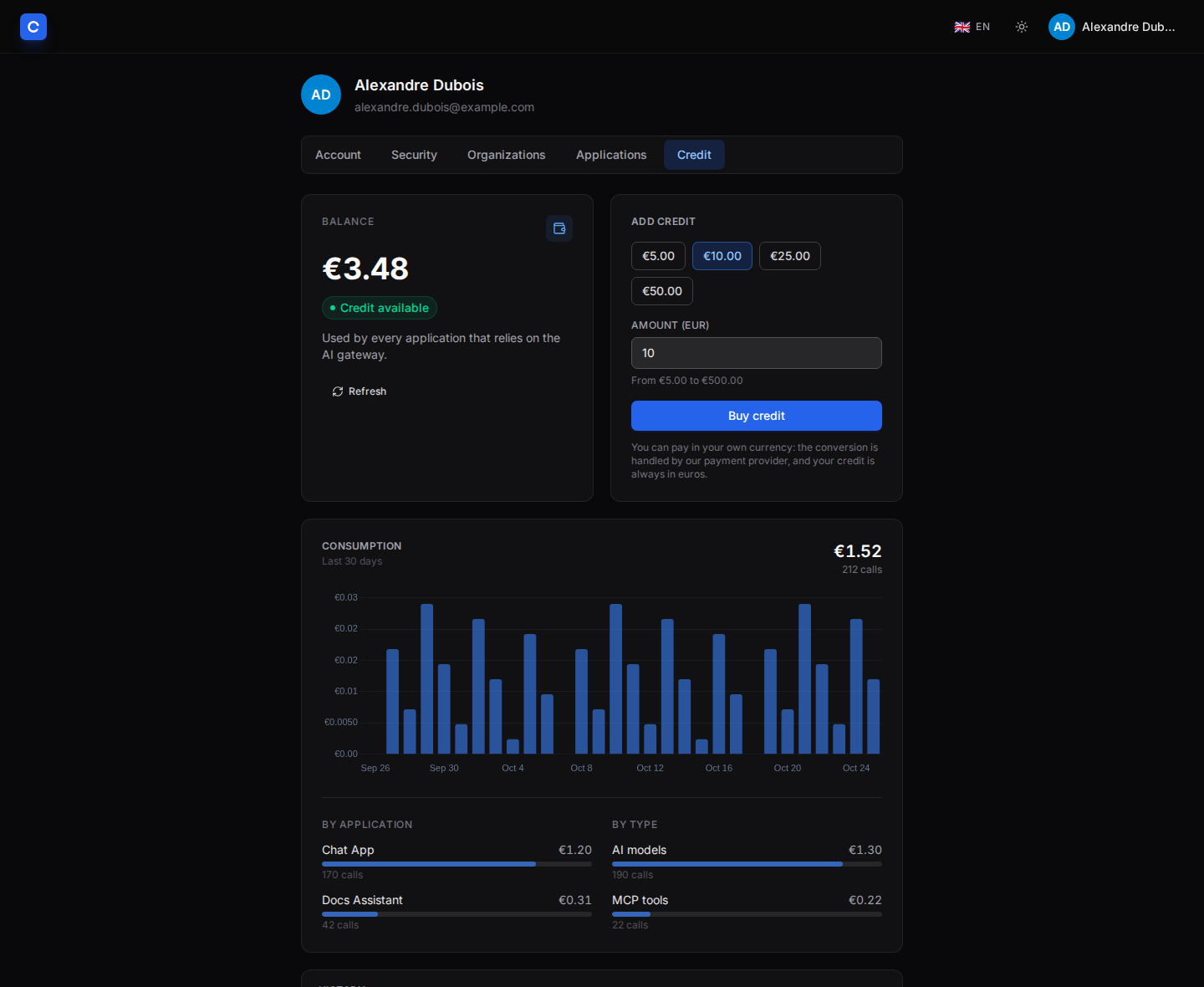
Every call that goes through the gateway appears in the wallet ledger as a usage transaction carrying the raw quantities (model and tokens, or MCP server and tool), the dollar cost, the exchange rate and margin applied, and the calling application (your slug). Users see the aggregated consumption — by day, grouped by application — in the Credit tab of their profile, each day opening a detail by model; administrators see spend, its breakdowns and the raw ledger in the Wallets and Accounting pages.
Spend by model
GET /api/user/wallet/stats returns byModel (amount, calls and prompt/completion/total tokens for each model) and daily (each day split by application and by model). Both are derived from the same ledger, so they always add up to total.
Attribute spend to a chat session
To tell, for one of your chat sessions, how much it cost, pass a session id with each gateway call — LiteLLM forwards it and auth-service records it on the transaction:
await client.chat.completions.create({
  model: "gpt-4o-mini",
  messages,
  metadata: { session_id: sessionId },   // any stable id of your choice
});
Then read it back for the user:
GET https://auth.example.com/api/user/wallet/usage?sessionId=<id>
Authorization: Bearer <wallet token>
{
  "sessionId": "…", "applicationSlug": "acme-app", "days": 30,
  "total": "18420", "notBilled": "0", "calls": 6,
  "byModel": [
    { "model": "gpt-4o-mini", "amount": "18420", "count": 6, "promptTokens": 1200, "completionTokens": 400, "totalTokens": 1600 }
  ]
}
- The session id is yours and declarative: auth-service stores it but never uses it for authorization. Pick a random, unguessable value.
- The query is scoped to the calling application (the token's
azp), so two applications that pick the same session id cannot read each other's spend. - The window defaults to 30 days (
days, 1–90); older sessions fall out of it. - auth-service does not display per-session figures itself: represent them on your side if you need to.
Things to know when you price your product:
- A model without a price is free. LiteLLM computes the cost from its price list: a self-hosted model needs
input_cost_per_tokenandoutput_cost_per_tokenset in LiteLLM. - MCP tools are billed only if the server declares a cost (
mcp_info.mcp_server_cost_info, in dollars; see LiteLLM's MCP documentation for the fields). - Charges are made after the call, so a burst of parallel calls on a small balance can overshoot into debt. The per-user ceilings above bound it.
- If auth-service is briefly unreachable, the gateway keeps the debits on disk and retries them with idempotency keys: a retry never charges twice.
- Your own business metrics (documents processed, seats…) are a different mechanism: Consumption tracking.
Refill
Credit is added in one of three ways:
- Online, by the user (Stripe). The Credit tab of the profile page shows quick amounts and a free amount within
WALLET_TOPUP_MIN_EURandWALLET_TOPUP_MAX_EUR(5 to 500 EUR by default). It opens a Stripe Checkout in the customer's currency; the credit granted is the euro amount. It needsSTRIPE_SECRET_KEYand the webhook, see Stripe integration. - Manually, by a superadmin. Without Stripe, the user page of the admin interface records a top-up (with the invoice reference), grants credit (with a reason), or adjusts the balance. Everything is audited in the accounting journal.
- Refunds and disputes take credit back automatically, which can leave a wallet in debt.
Opening the Checkout requires the user's session, not a bearer token. Your application therefore does not create it: it links the user to the Credit tab, <BETTER_AUTH_URL>/profile, when canSpend is false or a call answers 402. GET /api/user/wallet/topup-options tells you whether online top-up is enabled ({ "enabled": false, "currency": "eur", "minCents": 500, "maxCents": 50000 }), so you can word the message accordingly: "top up your credit" or "ask your administrator".
The next call after a top-up is accepted within about five seconds.
Operating it
| Task | Where |
|---|---|
| See credit held, debt, spend and top consumers | Admin → Wallets |
| Change the exchange rate and margin | Admin → Wallets → Edit pricing (superadmin, with a reason; applies to the next call) |
| Give credit, correct a balance, mark an account unlimited | Admin → Users → the user's page (superadmin) |
| Audit every top-up, grant and plan change | Admin → Accounting |
| Check the gateway's spend logs against the wallet | pnpm llm:reconcile |
Reference implementation
RE:GINE (the gine repository) integrates the gateway and the wallet exactly this way: a confidential application behind a BFF, a single login requesting the three audiences, a per-user server-side token vault that mints one narrowed token per audience, a wallet read before each run (canSpend) with the run refused up front when the user cannot pay, and a "top up" link to the identity provider's profile page.
Checklist
- Application registered, LiteLLM support on, each plan's access group filled in LiteLLM.
- Authorization request repeats
resourcefor your API, the gateway and auth-service, and requestswallet:self:readandoffline_access. - Code exchanged without
resource; one narrowed token minted per audience; refresh tokens stored server-side and replaced at each refresh. - 402 handled: user told, wallet link shown, no automatic retry.
- Wallet read with
canSpendbefore expensive work, failing closed. - Models used by your application have a price in LiteLLM.